Invoice the job, from the job.
Start from the finished work order, enter your prices, and print the invoice. It never changes stock.
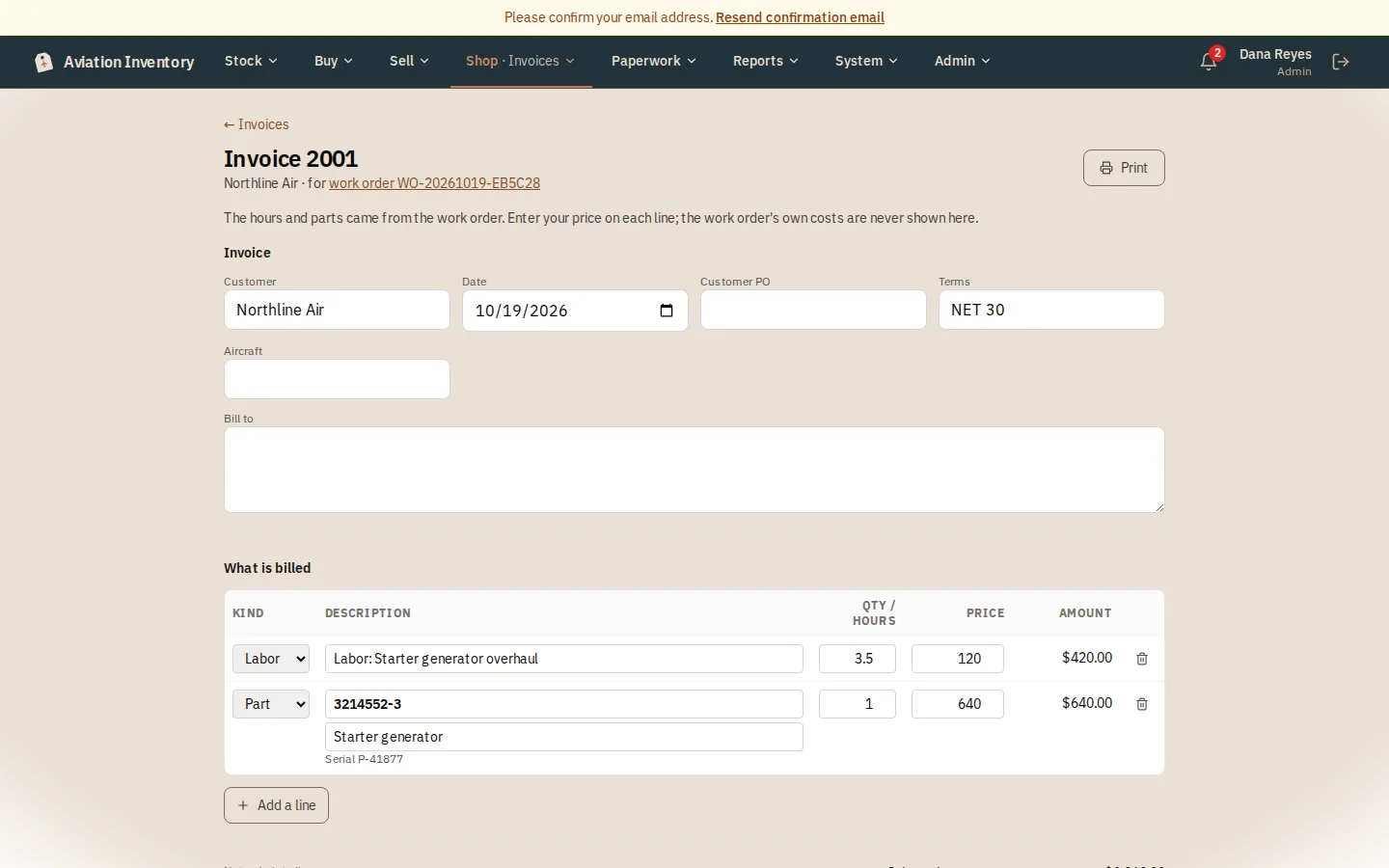
What it does
- The labor hours and each part used are copied across with no price; you enter your price on every line and the page tells you how many still have none
- Add a line for shop supplies or anything else, and set tax and freight; the total updates as you type
- Proforma invoices for customs and international shipping, from any sales order
- To undo an invoice, void it with a reason; it is never deleted
- Prices are money, so invoicing is for admins and managers
How it works
Open the work order
Press Create invoice and type who is being billed.
Enter your prices
The labor hours and each part used are copied across with no price. Enter your price on every line; the page tells you how many still have none.
Add the rest
Press Add a line for shop supplies or anything else, and set tax and freight. The total updates as you type.
Save and print
Press Save changes, then Print. To undo an invoice, void it with a reason; it is never deleted.
Step-by-step guides
Questions
- Does invoicing change my stock?
- No. It never changes stock.
- Can I delete an invoice?
- No. To undo one, void it with a reason; it stays on the record.
Keep reading
Try it with your own parts.
14 days free. No credit card required.