Everyone sees what their job needs.
Five roles, from admin to viewer, so a mechanic works their own jobs, a supervisor approves, and prices stay with the people who run the money.
What it gives you
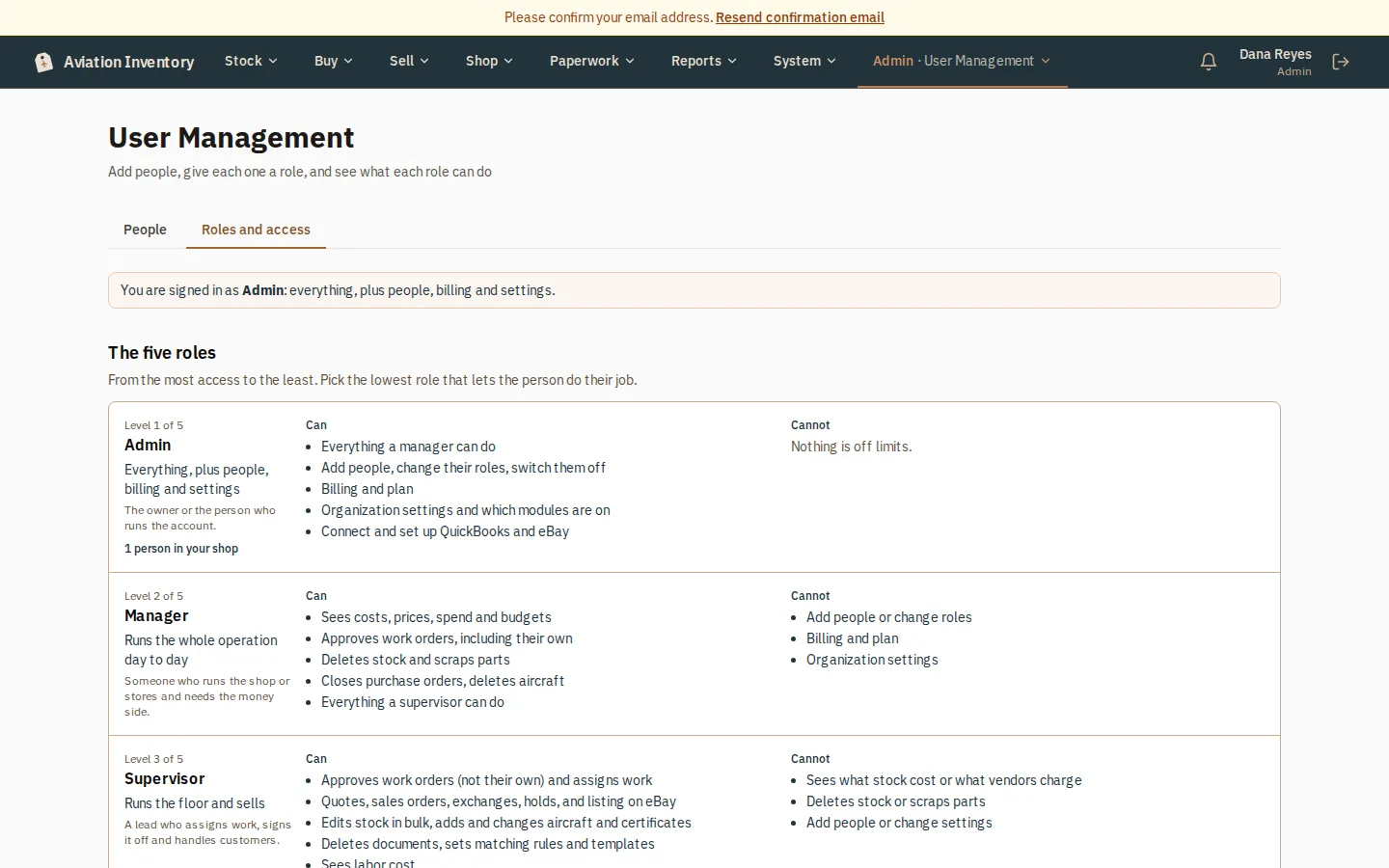
- Admin, manager, supervisor, mechanic and viewer, each with a plain card saying who it is for, what it can do and what it cannot
- A table with a Yes or No for each area and role, with your own column shaded
- Admins also see how many people hold each role
- A mechanic sees the work orders assigned to them; prices and costs are for admins and managers, in the screens and on the server
How it works
Open Roles and access
Admins: Admin > User Management, then the Roles and access tab next to People. Everyone else: the link on your Account page. Anyone signed in can read it.
Read the five roles
They run from most access to least. Each card says who it is for, what it can do and what it cannot. Admins also see how many people hold each role.
Check the table
It lists each area with a Yes or No for every role. Your own column is shaded.
Choose a role for a new person (admin)
On the People tab, Add New User. Pick the lowest role that lets them do the job; the box describes the role you pick.
Step-by-step guides
Questions
- Who can see prices and costs?
- Admins and managers only.
- How do I choose a role for a new person?
- Pick the lowest role that lets them do the job. The box describes the role you pick.
Keep reading
Try it with your own parts.
14 days free. No credit card required.